


CVS Health
4.5159.52K Reviews
App Specs
- Version
- 26.10.33
- Updated On
- License
- Free
- Downloads
- 10,000,000+
- Developer
- CVS Pharmacy
- Categories
- Medical
- Platform
- Android, iOS
Screenshots

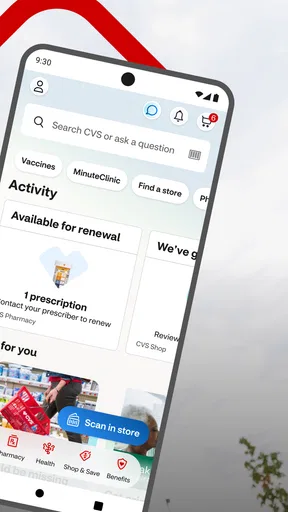
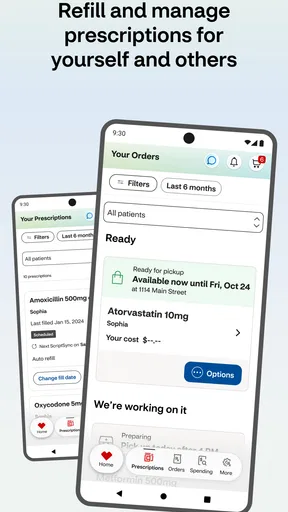
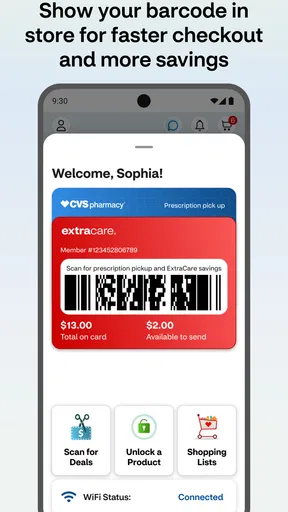
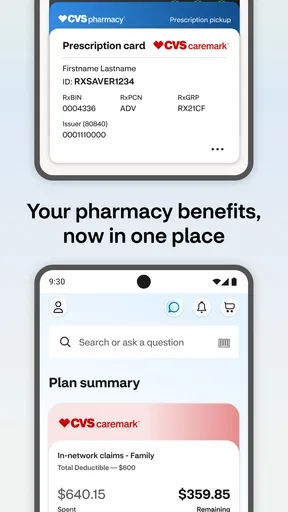
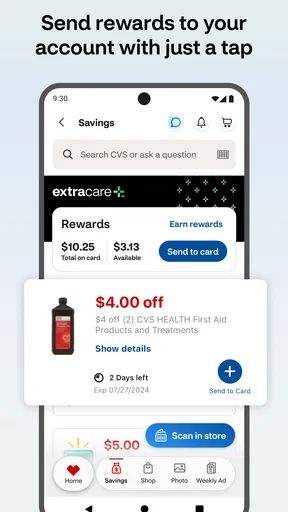
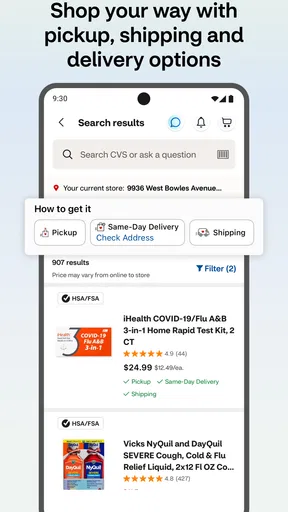
 Analysis by AppCompare
I find the CVS Health app most useful when CVS is already part of someone’s routine: picking up prescriptions, arranging a basic health visit, or checking ExtraCare savings while shopping. Its medical and retail roles sit side by side, which can save time when those errands overlap. That convenience is also the main reason to use it; if you rarely visit CVS, a pharmacy app tied to your regular provider or a clinic’s own booking option may suit you better.
What I would consider before trusting it with health tasks
CVS Pharmacy develops the app, and that connection makes its purpose clear: it brings CVS pharmacy services, health-care scheduling, and shopping into one place. I would treat it as a practical route to those services, not as a substitute for speaking with a pharmacist or clinician when a health question needs an answer. The app is free and rated for Everyone, but those facts alone do not tell me how a person’s information is handled or what choices are available inside an account. I would review the app’s visible account and privacy settings directly before entering sensitive details.
The app has an average rating of 3.3 from around 400,000 ratings, alongside roughly 145,000 written reviews and over 10 million installs. That broad use suggests it serves many CVS customers, but the rating is a useful reminder that convenience does not guarantee a smooth experience for everyone. I would keep a little flexibility in a time-sensitive plan: confirm important prescription or appointment details through the appropriate CVS channel rather than assuming a screen alone settles every issue.
Where the controls matter most
Prescription tasks deserve more care than ordinary shopping. Before relying on a refill request, I would check that I have selected the intended prescription and pharmacy, then review the status afterward. For someone managing several medicines, taking a moment to distinguish one medication from another is more useful than rushing through the steps. The app can make routine administration easier, but I would still follow the label and ask a pharmacist about changes, missed doses, or questions the app cannot resolve.
Notifications can help a person notice updates, but they are not a complete medication-management plan. I would choose notification settings deliberately and avoid treating an alert as proof that a prescription is ready for pickup. If a dose is important or a refill is urgent, I would use a separate reminder or contact the pharmacy as needed. This is a small but meaningful distinction: the app can support a routine, while the user remains responsible for confirming what action is actually required.
Account access is another moment to slow down. I would use the account controls that are visible in the app, keep sign-in details private, and avoid opening prescription information where other people can see the screen. If a family member helps with errands, I would make sure any account access is intentional rather than casually sharing a login. Those habits are sensible for any health-related service, and they matter especially when a phone also displays ordinary shopping activity.
How I would fit it into a real week
Imagine I notice during a weekend shop that a prescription is running low. I can use the app to check the prescription and start a refill request, then look for its status later instead of waiting until the last minute. If the timing or instructions are unclear, I would call the pharmacy rather than guessing. The advantage is having the pharmacy task close to the shopping and rewards tools; the trade-off is that I still need to pay attention to which part of the app I am using and whether the request has actually progressed.
Worth Reading Before You Choose

Flipboard Shows What News Apps Must Do Beyond the Feed

Switching to Android Auto Means Rethinking Your Driving Routine

Google Calendar Makes a Crowded Week Easier to Manage

Ludo King Makes the Most of the Minutes Between Plans

Baby Panda World Brings Quick Play to Modern Phones, but Its Game Library Feels Busy

ESPN’s Live Game View Makes Following Close Games Easier
For a quick clinic visit, scheduling through the app may be handy when I already know I want a CVS MinuteClinic appointment. I would check the selected location and appointment details before confirming, especially if I am coordinating transport or work. A clinic’s direct contact route may be better if I need to describe a complicated concern, ask whether a service is appropriate, or resolve a booking problem. The app is most useful for straightforward arrangements, not for deciding what kind of medical care a symptom requires.
Shopping has a different kind of sensitivity. ExtraCare savings and product browsing can make an errand more organized, but I would separate a discount from a health decision: a promotion should not decide which medicine or care option is appropriate for me. I would check product details carefully and ask a pharmacist when the choice involves a health concern. Keeping that distinction in mind helps the app stay a convenience tool rather than an authority on treatment.
Who gets the most value, and what alternatives do better
I would recommend trying it to someone who fills prescriptions at CVS, wants to arrange a straightforward clinic visit, and also uses ExtraCare. It is particularly convenient when those tasks happen in the same week, because one app can reduce the need to switch between separate pharmacy, clinic, and shopping routines. The current version is 25.12.42, and the app requires Android 10 or later; anyone on an older Android release should check compatibility before planning to rely on it.
Someone who uses another pharmacy most of the time may be better served by that pharmacy’s own app, where the prescription relationship is already established. For health questions, a clinician’s patient portal or a direct call is often a better fit than a retail pharmacy app. And if the main goal is simply tracking medicines, a dedicated medication reminder may feel more focused, though it will not combine that task with CVS refills, clinic scheduling, and ExtraCare shopping.
My practical advice is to start with one low-pressure task, such as checking a routine prescription or browsing rewards, and learn where the relevant account and notification choices are before using it for something urgent. That gives me a chance to see whether the layout works for my habits without depending on it in a crunch. I would also keep a backup way to contact the pharmacy or clinic, because digital convenience is most reassuring when it does not become the only route available.
Hey there! So, I recently got my hands on the CVS Health app, and let me tell you, it's been quite the ride navigating through its features. If you're someone who frequents CVS for your health needs, this app might just become your new best friend.
Getting Started with Ease
First things first, downloading the CVS Health app was a breeze. A quick search in the app store, and I was ready to go. The installation was smooth and quick, which is always a win in my book. Once you open the app, you're greeted with a clean interface that's pretty intuitive.
Features That Stand Out
Now, let's dive into the features because that's where the magic happens. One of the standout features is the ability to manage prescriptions effortlessly. Have you ever forgotten to refill a prescription? Well, with this app, you can set reminders, track your meds, and even order refills with a tap.
Another feature I found super handy was the MinuteClinic option. If you're like me and hate scheduling doctor visits, this feature lets you check wait times and book appointments at your local CVS MinuteClinic. It’s a lifesaver for quick health check-ups.
Shopping Made Simple
The app also offers an easy-to-use shopping experience. You can browse through products, see weekly ads, and even score some sweet deals with the ExtraCare card. It's like having the entire CVS store right in your pocket.
Speaking of the ExtraCare card, the app keeps track of your rewards, so you don't have to. No more fumbling around with physical cards or trying to remember your account details. It's all there, ready for you to use.
Navigation and User Experience
As far as navigation goes, the app is pretty straightforward. The menu is accessible and provides quick links to all the major features. Whether you're looking to refill a prescription or check out the latest deals, everything is just a few taps away.
One thing I noticed is how responsive the app is. There’s minimal lag between screens, which makes for a smooth user experience. Plus, the notifications are timely without being too intrusive, keeping you updated on all things CVS.
Final Thoughts
All in all, the CVS Health app is a fantastic tool for anyone who relies on CVS for their health and wellness needs. It’s packed with features that make managing prescriptions and shopping super convenient. If I had to sum it up, this app is all about making life easier, and who doesn't want that?
So, if you haven't already, give the CVS Health app a shot. It's free, it’s useful, and it might just become a staple in your everyday routine.
Pros
- User-friendly interface for easy navigation.
- Access to wide range of healthcare services.
- Seamless prescription management.
- Convenient online appointment booking.
- Real-time notifications for prescription refills.
Cons
- Occasional app crashes reported by users.
- Limited features without account creation.
- Some users experience slow loading times.
- Location services required for full functionality.
- In-app ads can be intrusive.
FAQs for CVS Health
What features does the CVS Health app offer?
The CVS Health app provides a comprehensive suite of features to manage your health and wellness. Users can refill prescriptions, track medication, and set reminders for doses. Additionally, the app offers a MinuteClinic locator, access to your personal health records, and digital shopping for health-related products.
Is the CVS Health app user-friendly for seniors?
Yes, the CVS Health app is designed with a user-friendly interface that is accessible to seniors. It includes easy navigation, large text options, and voice command features for those who may have difficulty with traditional touch controls, ensuring that users of all ages can benefit from its functionalities.
How secure is my personal information on the CVS Health app?
The CVS Health app employs robust security measures to protect your personal information. It uses encryption and secure login processes to safeguard your data. Additionally, CVS adheres to strict privacy policies, ensuring that your health records and personal information are kept confidential and secure.
Can I use the CVS Health app to manage prescriptions for my family members?
Yes, the CVS Health app allows you to manage prescriptions for family members through the Family Access feature. This enables you to refill prescriptions, track medication schedules, and receive notifications for multiple profiles, making it easier to manage the health needs of your loved ones in one convenient place.
Does the CVS Health app integrate with other health and fitness apps?
The CVS Health app integrates with a variety of health and fitness apps, allowing for a more comprehensive view of your wellness. It can sync with apps that track physical activity, dietary habits, and other health metrics, helping you maintain a holistic approach to managing your health.


